Ask any restaurant manager where service breaks down and the answer is almost always the same: between the counter and the kitchen. An order is taken correctly, but the slip falls behind the tandoor, a change is shouted across the room and forgotten, or two orders for "Table 4" get mixed. The customer only sees the result — a late or wrong plate.
Why paper order slips fail
- They get lost. Heat, oil and a crowded pass are not kind to paper.
- There is no status. The counter cannot see whether an order is being cooked or still waiting.
- The order of priority is unclear. Slips get picked in whatever order they happen to lie.
- No record. At the end of the night, nobody knows how long orders actually took.
How a kitchen display works
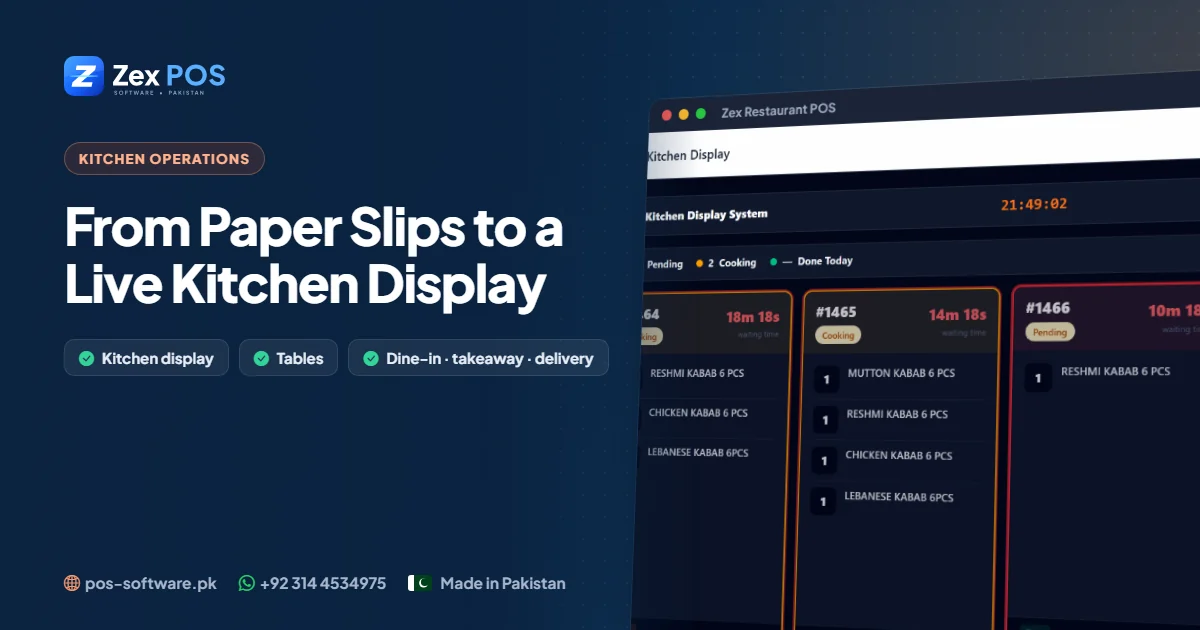
In Zex Restaurant POS, every order placed at the POS — dine-in, takeaway or delivery — appears on the kitchen screen. The screen refreshes live, so new orders show up without anyone pressing a button. Each order moves through three simple states:
| Status | Meaning | Who changes it |
|---|---|---|
| Pending | New order, not started | Created automatically by the POS |
| Cooking | Being prepared | Cook taps when starting |
| Done | Ready to serve or pack | Cook taps when finished |
The counter and waiters can see which orders are ready, and the kitchen always knows what is still waiting.
Keep printed kitchen slips where they help
Some stations — a tandoor, a fryer, a separate BBQ counter — still like a piece of paper. Kitchen slips can be printed for those stations while the display remains the single source of truth.
Setting it up in your kitchen
- Choose a screen. Any monitor, TV with a small PC, or tablet with a browser works — the kitchen screen is part of the web-based system.
- Mount it where the head cook can see it without walking away from the station.
- Agree the rules: mark "cooking" when you start, "done" when it's on the pass. Nothing else.
- Train for one quiet shift before a busy weekend.
What changes after a week
- Fewer "where is my order?" trips from waiters to the kitchen
- Takeaway and delivery orders ready on time for their slot
- Fewer forgotten items, because the full order is on screen
- A calmer pass during rush hour
Combine it with time slots
For takeaway and delivery, use time slots so the kitchen receives orders paced to what it can actually cook. A kitchen display shows what to cook; slots make sure it isn't asked to cook everything at 9 PM.
Read our full restaurant POS guide, or ask for a live demo on WhatsApp.
Waqas Ali
Waqas ALi
My name is Waqas ali im currently working as software developer in different Field